Home - AI Code Tools - Cursor
Cursor Tool Logo

Pricing model: $20.00 Per Month

Follow in social:

Cursor

Cursor: Explore AI-Powered Coding & Development

Cursor is an AI-powered code editor designed to help developers write, understand, edit, and debug code more efficiently. Explore Cursor’s AI coding features, agent capabilities, codebase understanding, and development tools to see how it can fit into your programming workflow.
Use Case
Coding & Development
Target Audience
Beginners
Developers
Business / Teams
Output Type
Text
Code
Pricing Model
Freemium
Subscription
Enterprise
Free Plan​
Limited
API Access
Yes
Platform / Access Type
Web App
Desktop App
Limitations
Free plan limited
Usage Limit
Feature Restrictions
Plan Restrictions
Team & Collaboration
Enterprise
Team Workspace

Tool Overview

What Is Cursor?

Cursor is an AI-powered code editor built to help developers write, understand, modify, and debug software more efficiently. It is based on a modern code editor environment and integrates AI directly into the development workflow, allowing users to interact with their code using natural language.

Cursor can understand context across a codebase, generate and edit code, answer questions about existing projects, and assist with debugging and refactoring. Its agent capabilities can also perform multi-step coding tasks by navigating files, making changes, running commands, and iterating on the results.

Unlike using a general-purpose AI chatbot alongside a separate code editor, Cursor brings AI assistance directly into the coding environment. This makes it particularly useful for developers who want AI to work with their actual project structure and development workflow.

What Can You Use Cursor For?

Cursor can support developers throughout the software development process, from writing new code and understanding existing projects to debugging, refactoring, and completing larger multi-step development tasks.

AI-Assisted Coding

Generate new code, complete existing code, and turn natural-language instructions into working implementations directly inside the editor.

Codebase Understanding

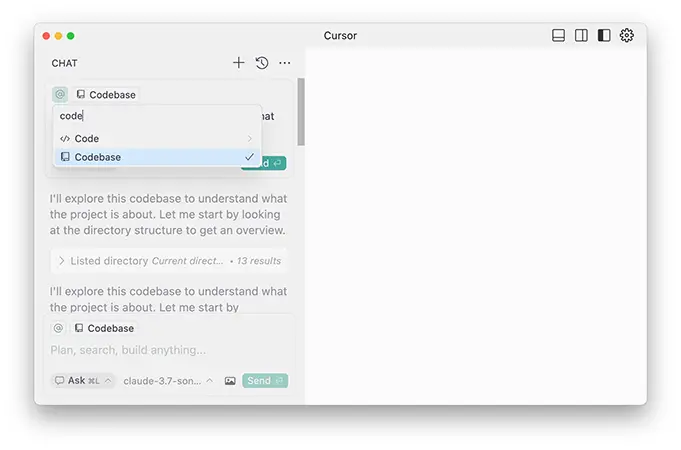
Ask questions about an existing project and use Cursor’s understanding of the codebase to locate relevant files, explain how different components work, and understand unfamiliar code.

Debugging & Error Fixing

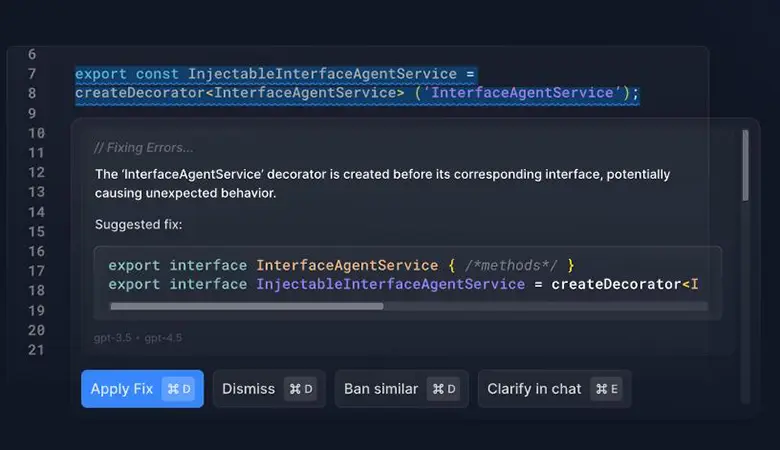
Identify potential problems, explain errors, and help implement fixes by analyzing the surrounding code and project context.

Code Refactoring

Improve existing code by restructuring functions, simplifying implementations, updating patterns, and making changes across multiple files.

AI Coding Agents

Use agent capabilities to handle multi-step development tasks, including navigating a codebase, editing files, running commands, and iterating on changes.

Feature Development

Describe a feature or change in natural language and let Cursor help plan and implement the required modifications across a project.

Code Documentation

Generate comments, documentation, explanations, and other supporting text based on the code and its context.

Testing

Create and modify tests, analyze test failures, and help developers improve test coverage and reliability.

Terminal & Command Assistance

Work with terminal commands and development tools as part of AI-assisted workflows, allowing Cursor to help with tasks beyond editing individual files.

Learning & Exploring Code

Use natural-language conversations to understand programming concepts, unfamiliar technologies, libraries, and existing implementations while working directly within a development environment.

Who Is Cursor For?

Cursor is primarily designed for developers who want to integrate AI directly into their coding workflow. It can be useful for both experienced programmers and people learning to code, while its advanced agent and codebase capabilities are particularly valuable for professional development teams.

Software Developers

Write, modify, debug, and refactor code with AI assistance directly inside the development environment.

Web Developers

Build and maintain websites and web applications with AI-assisted coding, debugging, feature development, and codebase understanding.

App Developers

Use Cursor to develop and modify applications across different programming languages and frameworks while working with project-level context.

Beginners & Students

Learn programming concepts, understand unfamiliar code, and build projects with AI assistance throughout the development process.

Experienced Developers

Speed up repetitive coding tasks, navigate large codebases, refactor existing implementations, and delegate more complex development tasks to AI agents.

Development Teams

Collaborate on software projects while using AI-assisted coding, codebase understanding, and agent-based workflows to improve development efficiency.

Key Features

AI Code Generation & Completion

Generate code from natural-language instructions and receive AI-powered suggestions while writing and editing code.

Codebase Understanding

Cursor can work with context from an entire codebase, helping developers understand existing projects, locate relevant code, and make changes across multiple files.

AI Coding Agents

Use AI agents to handle multi-step development tasks, including exploring a codebase, editing files, running commands, and iterating on implementations.

Agent Mode

Give Cursor a high-level task and let the agent plan and execute multiple coding actions instead of manually editing every file.

Natural Language Code Editing

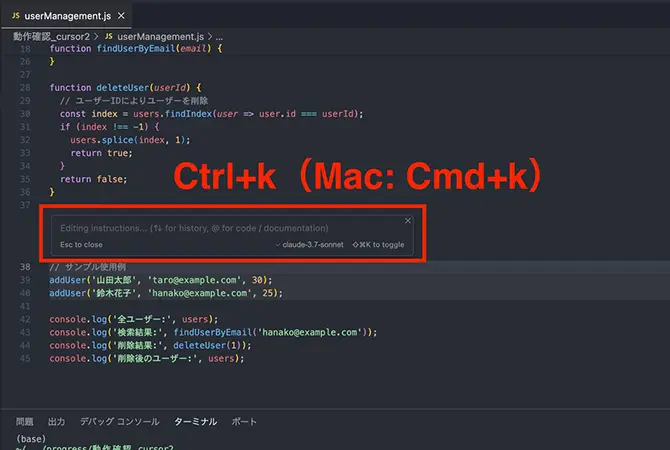
Describe the changes you want in plain language and have Cursor modify existing code while taking surrounding project context into account.

Debugging & Error Resolution

Analyze errors and unexpected behavior, identify potential causes, and assist with implementing and testing fixes.

Multi-File Editing

Make coordinated changes across multiple files when implementing features, refactoring code, or updating project structures.

Terminal Integration

Interact with the terminal and development commands from within the coding workflow, allowing AI-assisted tasks to extend beyond the editor itself.

Codebase Search & Context

Search and retrieve relevant information from a project so AI responses and generated code can be based on the surrounding code and project structure.

Rules & Custom Instructions

Define project-specific instructions and coding conventions to guide how Cursor's AI behaves when working with a codebase.

Model Choice

Choose from supported AI models and use different models depending on the coding task, performance requirements, and personal preferences.

Git Integration

Work with Git-based development workflows while using AI assistance for code changes, project management, and development tasks.

Cursor offers several subscription plans for individual developers, teams, and organizations. Paid plans provide access to higher usage limits and more advanced AI coding capabilities, while the free option allows users to try Cursor with limited usage.

Pricing & Plans

Hobby — Free

A limited free plan for users who want to try Cursor's AI coding features and experience its development workflow before subscribing.

Pro — $20/month

Designed for individual developers who want regular access to Cursor's AI coding features, agent capabilities, and higher usage limits.

Pro+ — $60/month

Provides substantially higher usage allowances for developers who rely heavily on AI-assisted coding and agent workflows.

Ultra — $200/month

Designed for power users who want significantly higher model usage and extensive access to Cursor's advanced AI capabilities.

Teams — $40/user/month

Built for development teams that need shared workspace capabilities, centralized management, and AI-assisted coding across team projects.

Enterprise — Custom Pricing

Designed for larger organizations that require enterprise-level security, administration, support, and customized usage arrangements.

Cursor offers several plans for individual developers, teams, and larger organizations. The main difference between the individual plans is the amount of AI usage and access to higher usage limits, while Teams and Enterprise add administration, collaboration, security, and organizational features.

For most individual developers, Pro is the standard starting point, while Pro+ and Ultra are designed for users who rely more heavily on AI agents. Cursor recommends Pro+ for daily agent users and Ultra for users with particularly high agent usage.


Feature Hobby Pro Pro+ Ultra Teams Enterprise
Monthly Price Free $20 $60 $200 From $40/user Custom
AI Coding Limited
Agent Usage Limited Extended 3× Pro Limits 20× Pro Limits Standard / Premium Pooled Usage
Frontier Models
Cloud Agents
Bugbot Usage-Based Usage-Based Usage-Based
Team Collaboration
Centralized Administration
Best For Trying Cursor Individual Developers Daily Agent Users Power Users Development Teams Large Organizations

User Environment

FAQ

What is Cursor? +
Cursor is an AI-powered code editor that integrates AI assistance directly into the development environment. It can help developers write, understand, edit, debug, and refactor code while working with project-level context.
Is Cursor free? +
Yes. Cursor offers a free Hobby plan with limited AI usage. Paid plans provide higher usage limits and access to more extensive AI capabilities.
What is Cursor Agent? +
Cursor Agent is an AI-powered development mode that can handle multi-step coding tasks. It can explore a codebase, edit files, run commands, and iterate on changes based on the task you provide.
Is Cursor good for beginners? +
Yes. Cursor can help beginners understand code, learn programming concepts, generate code, and troubleshoot errors. However, having a basic understanding of programming makes it easier to review and validate AI-generated code.
Can Cursor understand an entire codebase? +
Cursor can use context from a project's files and codebase to answer questions, locate relevant code, and assist with changes across multiple files. This allows its AI features to work with the structure and context of an existing project.
What programming languages does Cursor support? +
Cursor can be used with a wide range of programming languages supported by its underlying editor and AI capabilities, including JavaScript, TypeScript, Python, Java, C++, C#, Go, Rust, PHP, and many others.
Can Cursor write code from natural-language instructions? +
Yes. You can describe a feature, function, bug fix, or other coding task in natural language, and Cursor can generate or modify code based on your instructions and the available project context.
Can Cursor debug code? +
Yes. Cursor can analyze errors, inspect relevant code, explain potential causes, and help implement fixes. Developers can also use Agent capabilities to work through more complex debugging tasks.
Does Cursor work with Git? +
Yes. Cursor supports Git-based development workflows, allowing developers to work with repositories and use AI assistance while making and reviewing code changes.
Can Cursor use different AI models? +
Yes. Cursor provides access to multiple supported AI models, allowing users to choose different models depending on the coding task, performance requirements, and usage preferences.
Is Cursor better than GitHub Copilot? +
It depends on how you work. Cursor is particularly focused on AI-assisted development inside an AI-native code editor, with features such as codebase context and agent-based workflows. GitHub Copilot integrates AI assistance into existing development environments and GitHub workflows. The better option depends on your preferred workflow and the features you need.

Pros & Cons

Pros

  • Powerful AI Coding Assistance: Helps developers write, modify, explain, and debug code directly inside the editor.
  • Strong Codebase Understanding: Can work with project context and navigate larger codebases more effectively than basic code completion tools.
  • Advanced AI Agents: Supports multi-step development tasks involving file edits, terminal commands, and iterative changes.
  • Natural Language Editing: Developers can describe the changes they want instead of manually modifying every part of the code.
  • Multiple AI Models: Provides access to different AI models for different coding tasks and workflows.
  • Multi-File Editing: Useful for implementing features and refactoring changes across multiple files.
  • Developer-Focused Workflow: AI assistance is deeply integrated into the coding environment rather than being limited to a separate chatbot.
Cons

  • AI Usage Limits: Paid plans still have usage limits, particularly for users who rely heavily on agents and advanced models.
  • Higher Plans Can Be Expensive: Power users may need Pro+, Ultra, or usage-based options as their AI usage increases.
  • Learning Curve: Advanced features such as Agents, rules, context management, and model selection can take time to learn.
  • AI-Generated Code Requires Review: Cursor can accelerate development, but developers still need to test and review generated changes.
  • Resource-Intensive Workflows: Large codebases and complex agent tasks can require significant processing and may take longer to complete.
  • Best Suited to Developers: Users with little or no programming knowledge may find some of Cursor's advanced capabilities difficult to use effectively.

Reviews

There are no reviews yet.

Be the first to review “Cursor”

Your email address will not be published. Required fields are marked *

four × three =