n8n logo

Pricing model: $24.00 Per Month

Follow in social:

n8n

n8n: Explore AI Automation & Workflow Building

n8n is a powerful workflow automation platform that connects apps, APIs, data sources, and AI models to automate complex processes. Explore n8n’s automation capabilities, AI features, integrations, and workflow tools to see how it can fit into your business and development workflows.
AI Business Tools
business Tools
AI Code Tools
Code Tools
AI Automation Tools
Automation Tools
AI Productivity Tools
Productivity Tools
Use Case
Coding & Development
Data & Analytics
Automation & Agents
Target Audience
Marketers
Developers
Business / Teams
Output Type
Code
Data
Pricing Model
Freemium
Subscription
Enterprise
Free Plan​
Yes
API Access
Yes
Platform / Access Type
Web App
Desktop App
API Only
Limitations
Usage Limit
Feature Restrictions
Plan Restrictions
Team & Collaboration
Enterprise
Team Workspace

Tool Overview

What Is n8n?

n8n is a workflow automation platform that allows users to connect different applications, APIs, databases, and services and automate processes between them. Instead of manually moving information between tools or repeating routine tasks, users can build workflows that execute these actions automatically based on specific triggers and conditions.

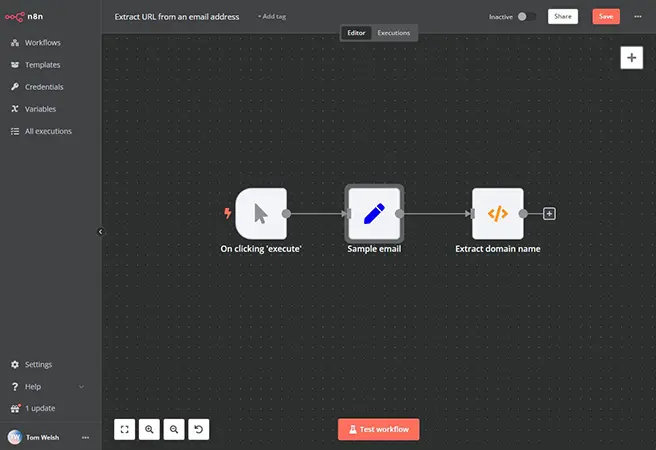
n8n combines a visual, node-based workflow builder with advanced customization options, including JavaScript and API requests. This makes it suitable for both users who want to build automations visually and technical users who need more control over data, logic, and integrations.

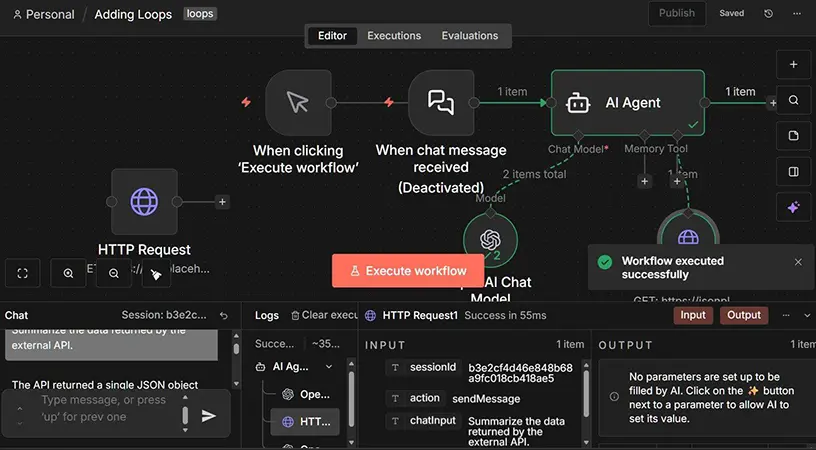
The platform also includes AI capabilities, allowing users to connect AI models, build AI-powered workflows and agents, process data, and integrate AI into existing business processes. n8n can be used through its hosted cloud platform or self-hosted, giving organizations more flexibility over how their automation infrastructure is deployed and managed.

What Can You Use n8n For?

n8n can be used to automate repetitive tasks, connect different software systems, process data, and build AI-powered workflows. Its flexible workflow builder makes it possible to automate simple tasks as well as complex, multi-step business processes.

Business Process Automation

Automate repetitive business processes such as updating records, moving information between systems, sending notifications, and managing routine administrative tasks.

AI-Powered Workflows

Connect AI models to business processes to automate tasks such as text generation, classification, summarization, information extraction, and AI-assisted decision-making.

AI Agents

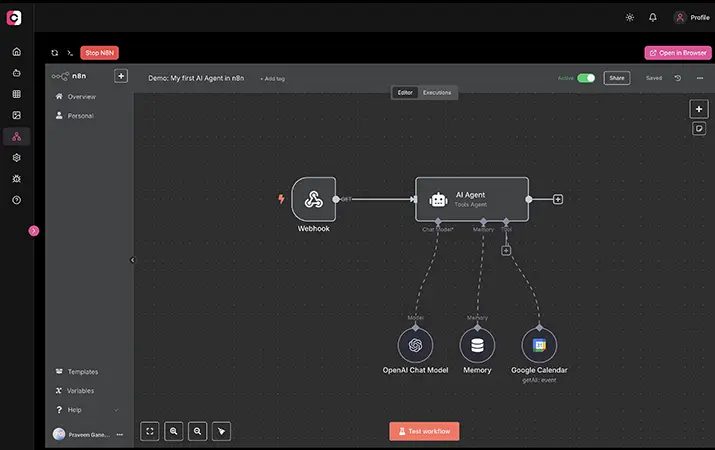
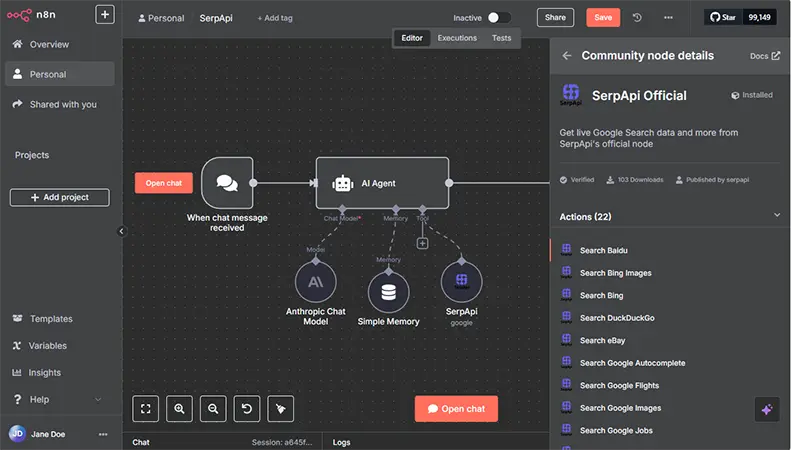
Build AI agent workflows that can use tools, access external services, retrieve information, and perform actions based on defined instructions and conditions.

App & API Integration

Connect applications, APIs, databases, and online services so information can move automatically between different systems without manual intervention.

Marketing Automation

Automate marketing workflows such as lead processing, customer data synchronization, campaign tasks, notifications, and content-related processes.

Data Processing

Collect, transform, filter, combine, and route data from different sources before sending it to another application, database, or service.

Lead Management

Automatically capture leads from forms and other sources, enrich or organize lead data, update CRM systems, and trigger follow-up actions.

Notifications & Alerts

Send automated notifications through email, messaging platforms, or other connected services when specific events or conditions occur.

Custom Workflows

Create highly customized workflows using conditional logic, webhooks, API requests, and custom code when standard integrations are not enough.

Who Is n8n For?

n8n is designed for developers, technical teams, marketers, and businesses that want more control and flexibility over their automation workflows. Its visual workflow builder makes automation accessible to non-developers, while its APIs, custom code, and self-hosting options provide deeper control for technical users.

Developers & Technical Teams

Build custom integrations, API-driven workflows, data pipelines, and complex automations using code, webhooks, and advanced workflow logic.

Marketers

Automate lead management, marketing processes, data synchronization, notifications, and other repetitive tasks across marketing platforms.

Business & Operations Teams

Automate repetitive business processes, connect internal and external systems, and reduce manual work across different departments.

AI & Automation Specialists

Build AI-powered workflows and agents that connect language models with business data, APIs, applications, and external tools.

Data & Technical Professionals

Collect, transform, process, and route data between databases, APIs, applications, and other data sources.

Small Businesses & Startups

Create custom automations without building every integration from scratch, helping small teams streamline operations and scale repetitive processes.

Enterprises

Connect business systems, automate complex processes, and build customized automation infrastructure with options for team collaboration, governance, and self-hosted deployment.

Key Features

Visual Workflow Builder

Build complex automations using a visual, node-based interface that lets you connect triggers, actions, logic, data processing steps, and external services.

Extensive Integrations

Connect workflows to a wide range of applications, databases, APIs, and online services using built-in integrations and customizable connections.

AI Workflows & Agents

Integrate AI models into workflows and build AI-powered agents that can access tools, retrieve information, process data, and perform actions.

API & Webhook Support

Connect n8n to external systems using APIs and webhooks, allowing workflows to receive data, trigger processes, and communicate with services that may not have a dedicated integration.

Custom Code

Add JavaScript or Python code to workflows when built-in nodes and standard automation logic are not enough for a specific use case.

Data Transformation

Filter, transform, merge, split, and process data as it moves between different applications and workflow steps.

Conditional Logic

Create branching workflows using conditions, rules, and logic to determine which actions should run based on incoming data or specific events.

Self-Hosting

Run n8n on your own infrastructure for greater control over deployment, data, security, and customization.

Workflow Templates

Start with pre-built workflow templates and adapt them to specific automation, integration, and AI use cases instead of building every workflow from scratch.

Human-in-the-Loop Workflows

Add human approval and review steps to automated processes when certain actions require manual confirmation before continuing.

n8n offers cloud-based subscription plans as well as self-hosted options. Cloud plans are priced based on workflow executions, while self-hosted options give users more control over their infrastructure and deployment.

Pricing & Plans

Community Edition — Free

A free self-hosted edition for users who want to run n8n on their own infrastructure and manage their own automation environment.

Starter — $24/month

Designed for individuals and small teams that need hosted workflow automation with a limited number of workflow executions each month.

Pro — $60/month

Provides a higher execution allowance and additional capabilities for users running more frequent or complex automation workflows.

Business — $667/month

Built for larger organizations that need higher execution limits, advanced collaboration, and greater control over their automation infrastructure.

Enterprise — Custom Pricing

Designed for organizations with more advanced requirements, including enterprise-scale automation, security, governance, and support.

n8n also provides self-hosted options for organizations and technical users who prefer to run the platform on their own infrastructure rather than using n8n Cloud

Feature Community Starter Pro Business Enterprise
Monthly Price $0 $24 $60 $667 Custom
Deployment Self-hosted Cloud Cloud Self-hosted Cloud / Self-hosted
Workflow Executions Self-managed 2,500 / month 10,000 / month 40,000 / month Custom
Workflow Builder
Integrations
AI Workflows & Agents
Collaboration Limited Basic Advanced Advanced Enterprise
Technical Support Community Standard Priority Priority Dedicated
Best For Self-hosting & Developers Individuals & Small Teams Growing Teams Larger Organizations Enterprise Automation

User Environment

FAQ

What is n8n? +
n8n is a workflow automation platform that connects applications, APIs, databases, and AI models to automate multi-step processes. It combines a visual workflow builder with advanced customization options such as custom code and API requests.
Is n8n free? +
Yes. n8n offers a free self-hosted Community Edition. Its hosted n8n Cloud service uses paid subscription plans based on workflow executions.
Does n8n have a cloud version? +
Yes. n8n Cloud is the hosted version of the platform, allowing users to build and run workflows without managing their own infrastructure.
Can n8n be self-hosted? +
Yes. n8n can be deployed on your own infrastructure, giving users greater control over their deployment, data, and automation environment.
Can n8n be used for AI automation? +
Yes. n8n supports AI workflows and AI agents, allowing users to connect AI models with applications, APIs, databases, and external tools to build automated AI-powered processes.
Can n8n build AI agents? +
Yes. n8n provides tools for building AI agents that can use connected tools, access information, process data, and perform actions as part of an automated workflow.
How many integrations does n8n have? +
n8n provides a large library of integrations and community nodes for connecting applications, services, APIs, and databases. Users can also connect services through generic API requests when a dedicated integration is not available.
Do I need coding skills to use n8n? +
No. Many workflows can be created using n8n's visual node-based interface without writing code. However, JavaScript, Python, API requests, and other advanced options are available for users who need more customization.
Is n8n good for businesses? +
Yes. n8n can automate processes across marketing, sales, operations, customer management, data processing, and other business functions. Its self-hosting and customization options can also make it suitable for organizations with specific technical or security requirements.
What is the difference between n8n and Zapier? +
Both platforms automate workflows and connect different applications, but n8n generally provides more flexibility for technical users through custom code, APIs, self-hosting, and more complex workflow logic. Zapier focuses more heavily on ease of use and straightforward no-code automation.
Is n8n better than Make? +
It depends on the workflow. n8n is particularly attractive for developers and technical teams that need self-hosting, custom code, APIs, and greater control over automation infrastructure. Make can be a better fit for users who prioritize a visual automation experience with less technical setup.
Can n8n connect to APIs? +
Yes. n8n can communicate with external APIs using built-in integrations, HTTP requests, webhooks, authentication options, and custom workflow logic.

Pros & Cons

Pros

  • Highly Flexible Automation: n8n allows users to build complex, multi-step workflows with conditional logic, custom data processing, APIs, and integrations.
  • Powerful AI Capabilities: Users can integrate AI models and build AI-powered workflows and agents that interact with external tools and data.
  • Extensive Integrations: n8n connects with a wide range of applications, databases, APIs, and services, making it suitable for diverse automation workflows.
  • Self-Hosting Option: Users can run n8n on their own infrastructure for greater control over deployment, data, and security.
  • Custom Code Support: JavaScript and Python support gives technical users greater control when built-in nodes and standard workflow logic are not enough.
  • Visual Workflow Builder: The node-based interface makes complex automation processes easier to design, understand, and maintain.
  • Strong Developer Support: APIs, webhooks, custom nodes, and technical integrations make n8n particularly powerful for developers and technical teams.
Cons

  • Steeper Learning Curve: n8n offers extensive functionality, but understanding nodes, expressions, APIs, data structures, and workflow logic can take time.
  • Can Be Complex for Simple Automations: Users looking for very basic task automation may find n8n more powerful and complicated than necessary.
  • Self-Hosting Requires Technical Knowledge: Running n8n independently requires knowledge of servers, deployment, updates, security, and infrastructure management.
  • Cloud Usage Is Execution-Based: n8n Cloud plans are based on workflow executions, so users running frequent or complex workflows need to monitor their usage.
  • Advanced Workflows Require More Maintenance: Complex automations involving multiple APIs and services can require ongoing maintenance when connected platforms change their APIs or behavior.
  • Some Features Require Technical Skills: Although many workflows can be built visually, advanced API integrations, custom code, and complex data processing may require development experience.

Reviews

There are no reviews yet.

Be the first to review “n8n”

Your email address will not be published. Required fields are marked *

4 × 3 =